QUICK ANSWER
Why the Color Picker Looks Wrong
The color picker is usually not copying a full material. It samples a color from the surface you click, but lighting, shadows, reflections, glossy materials, and the exact sampled spot can make the painted result look different.
Sample from a flatter, less reflective part of the surface, paint a small test patch first, and adjust manually if the result is too dark, too bright, or too saturated.
This is not always a bug. The eyedropper copies a color sample, not complete textures, patterns, lighting, reflections, or material behavior.
How to Fix a Bad Color Match
These player-tested examples show how a sampled color can look different from the target surface, and how a small manual adjustment can produce a closer match.
STEP 1 · COMPARE THE SAMPLE
The Sampled Color Looks Off
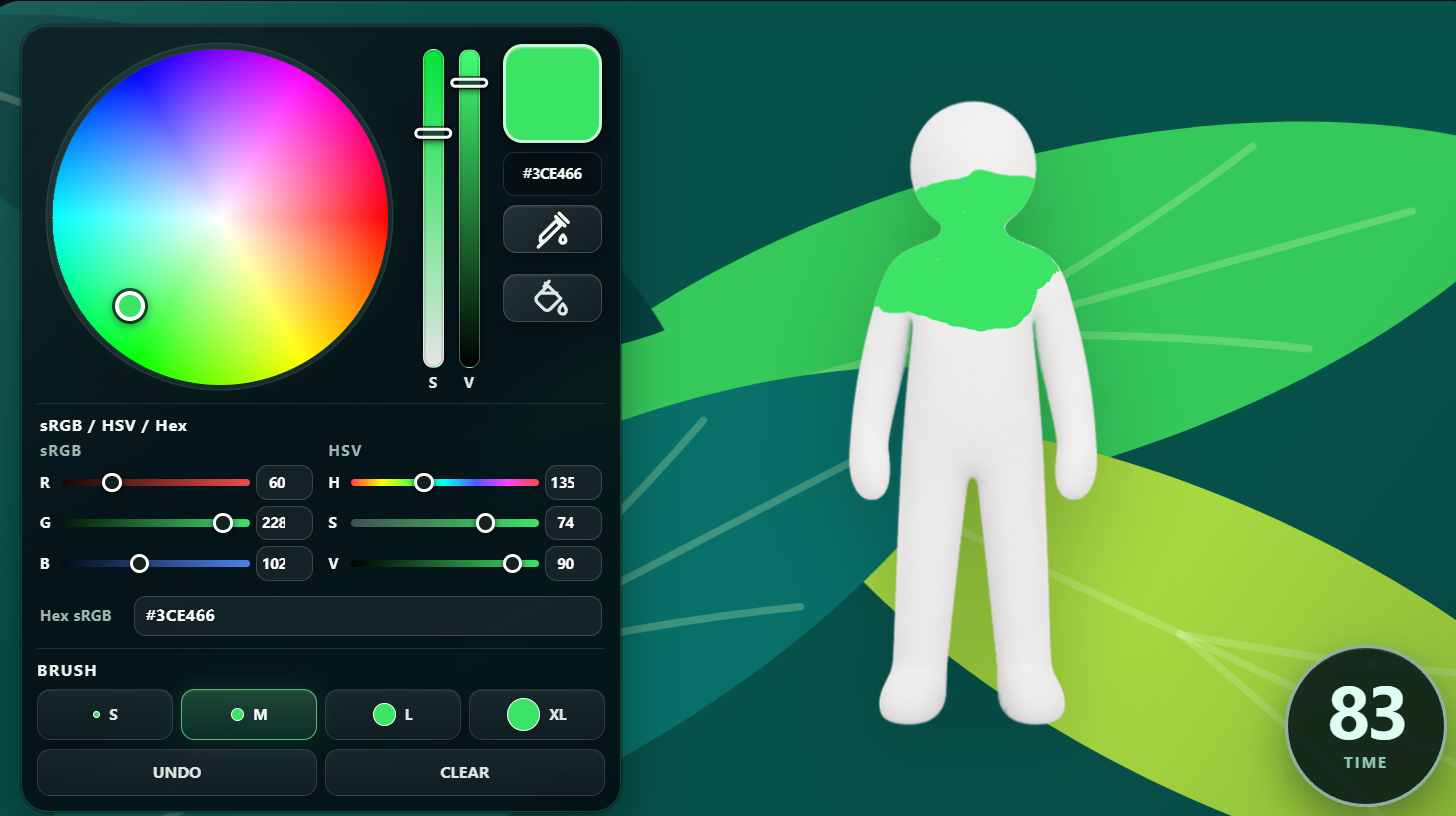
After using the eyedropper, compare the painted test area with the surface you sampled. The selected color may look too bright, too dark, or slightly different from the target.
STEP 2 · ADJUST AND RETEST
Fine-Tune the Color Manually
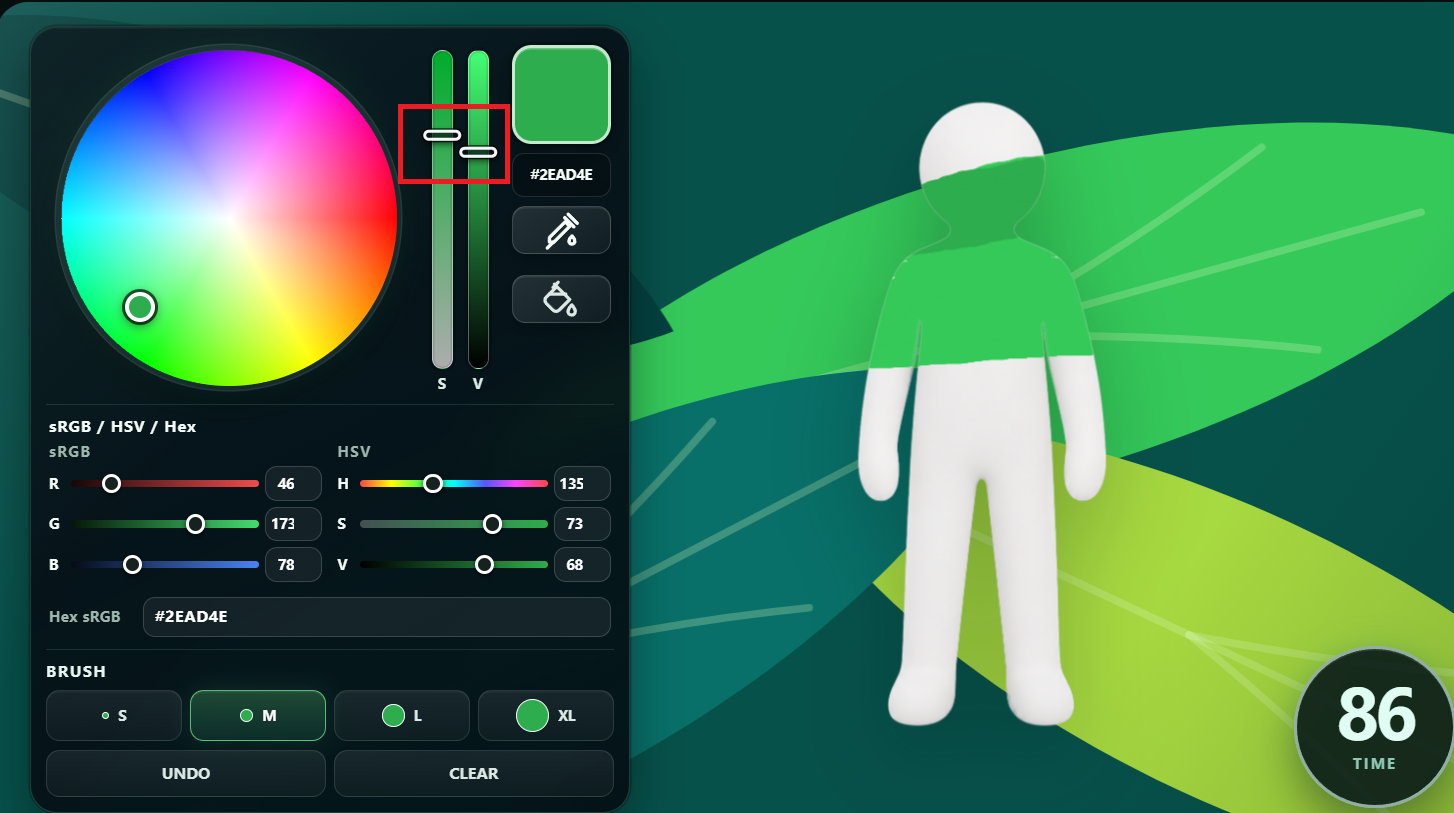
Adjust the color sliders in small steps, then test the result again. In this example, lowering the brightness produces a color that blends more closely with the target surface.
Practice examples from our fan-made color matching tool. They illustrate the adjustment process and are not screenshots from the official game.
WHY PRACTICE HELPS
Is the Eyedropper Broken?
These examples show why the eyedropper is best treated as a starting point rather than a guaranteed final match. A sampled color may still look different from the target surface once it is painted onto the Hider.
That does not always mean the color picker is broken. The visible result can change because of lighting, shadows, highlights, reflections, the sampled spot, and how the color appears on the Hider.
Manual correction is not always accurate on the first attempt. You may need several small adjustments, comparisons, and retests before the color feels right. With practice, it becomes easier to notice brightness and color differences and reach a closer match with less trial and error.
Build your color-matching feel in our free fan-made practice tool before your next match.
Practice Color Matching →
Common Reasons the Color Looks Bad
The sampled color looks too light.
The color appears different from the surface under the crosshair.
A pale or blue-tinted shade is selected from a white or neutral surface.
The result changes when sampling another part of the same object.
The painted body looks correct in the color picker but wrong in the actual scene.
Lighting changes across the scene, shadows, highlights, reflections, glossy or reflective materials, surrounding colors, viewing angle, and the exact sample point may affect what players see. This guide does not claim every bad match is a confirmed bug.
If the whole custom map looks unusually dark, object edges turn black, or friends do not see the same lighting, check the dark shadows bug guide before assuming the eyedropper is the only issue.
When to Sample Again
- Step 1Sample from a flatter part of the surface.
- Step 2Paint only a small test patch on the Hider.
- Step 3Compare the test patch with the target surface from the same viewing angle.
- Step 4If the result looks too dark or too light, adjust brightness slightly.
- Step 5If brightness looks close but the color still feels wrong, make a small saturation or hue adjustment.
- Step 6Test again before painting the full body.
Start With a Better Sample
In player testing, a sampled color that looks wrong is often easier to correct by adjusting brightness first. Only change saturation or hue after comparing the small test patch carefully.
What the Eyedropper Actually Copies
- The eyedropper copies a color sample from the surface you click.
- It does not copy full textures, patterns, lighting, reflections, material behavior, roughness, or glossiness.
- Aim at a larger, flatter section of the surface.
- Avoid borders, shadows, highlights, reflections, and tiny texture details.
- Try another point on the same object if the first result looks wrong.
- Compare the color while facing the surface from a similar angle.
- Test on one body area before painting everything.
- Recheck the result after changing pose or camera position.
- Use nearby environmental colors rather than chasing a theoretically perfect value.
Lower roughness creates a smoother, glossier, more reflective-looking surface. Higher roughness looks more matte with softer scattered highlights. Roughness does not automatically make brush edges smoother or make eyedropper sampling more accurate.
If your cursor disappears after pressing F, that is a different player-reported issue from a visible sample that looks wrong.
Meccha Chameleon Eyedropper FAQ
Why does the color picker look wrong in MECCHA CHAMELEON?
The eyedropper samples a color from the clicked surface, not a full material. Lighting, shadows, reflections, glossy materials, and the exact sampled spot can make the painted result look different.
Is the eyedropper broken?
Not necessarily. A bad-looking match can happen because of lighting, shadows, reflections, surface detail, or sampling the wrong spot, so test a small patch before assuming it is a bug.
Does the eyedropper copy full textures?
No. It copies a color sample, not full textures, patterns, lighting, reflections, material behavior, roughness, or glossiness.
Why does the copied color look darker or brighter?
Lighting changes across the scene, shadows, highlights, reflections, and nearby colors can make the sampled color look darker or brighter after painting.
Why do glossy surfaces look hard to match?
Glossy or reflective surfaces can show bright highlights and reflections, so a single sampled color may not match the whole material.
How do I fix a bad color match?
Sample from a flatter, less reflective area, avoid strong highlights and deep shadows, paint a small test patch, and manually adjust brightness, saturation, or hue if needed.
Should I sample shadows or highlights?
Usually no. Deep shadows and strong highlights can create a bad match. Try a flatter, more evenly lit part of the surface first.
Does roughness make the eyedropper more accurate?
No. Lower roughness looks smoother and more reflective, while higher roughness looks more matte. Roughness does not make brush edges smoother or eyedropper sampling more accurate.